



As the new semester begins, the Scientific Computing & Data Analysis Section (SCDA) invites you to a full week of training to get your computing set up and your questions answered.
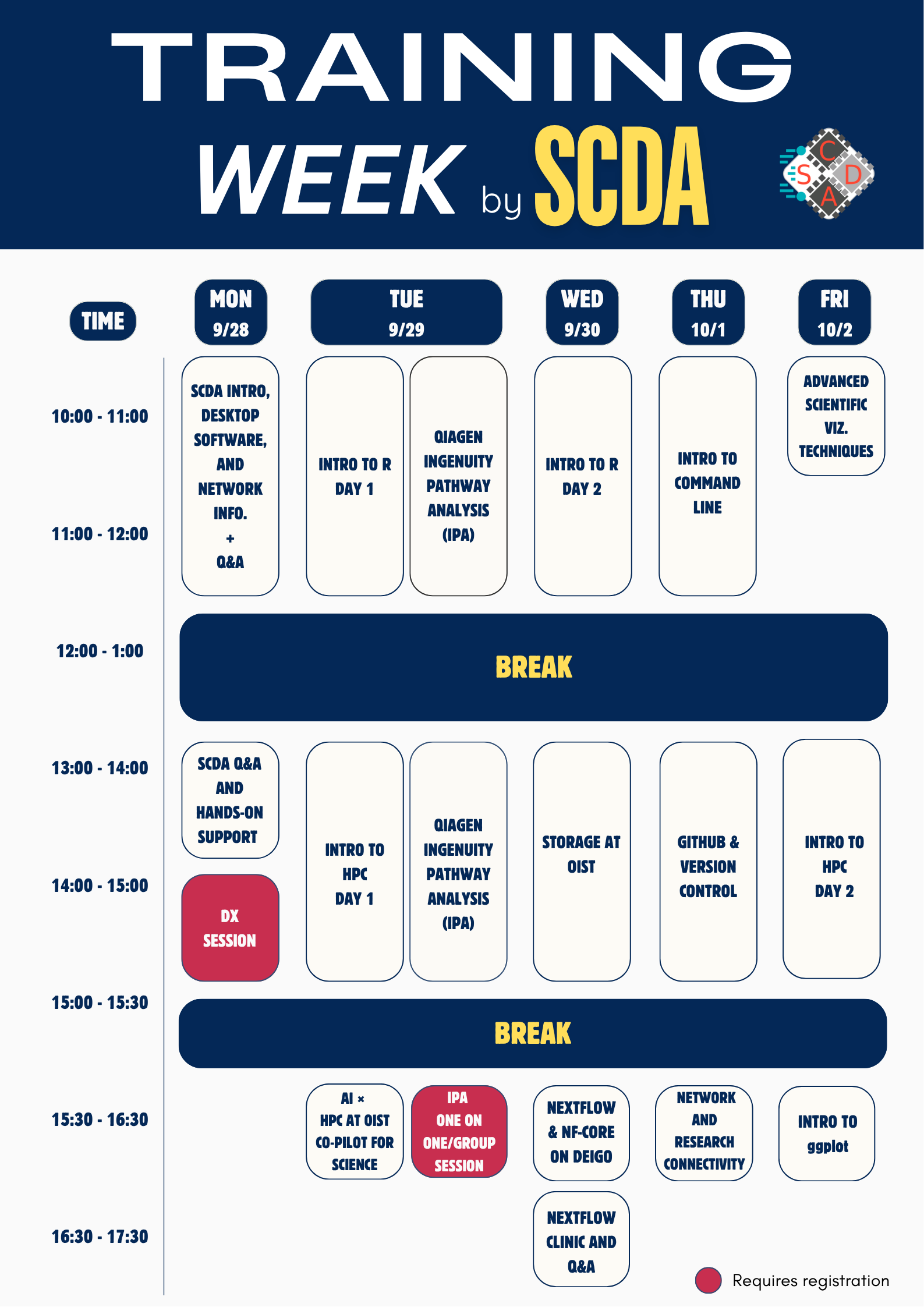
We’re running a starter-pack week covering Intro to HPC, Intro to Bash, storage, visualization techniques, and how to use AI on the cluster. The SCDA Network team will also be joining us, alongside guest speakers. Plus a special external workshop on QIAGEN Ingenuity Pathway Analysis (IPA)!
Open to everyone. Come for the full week, or drop in to just the sessions you need.
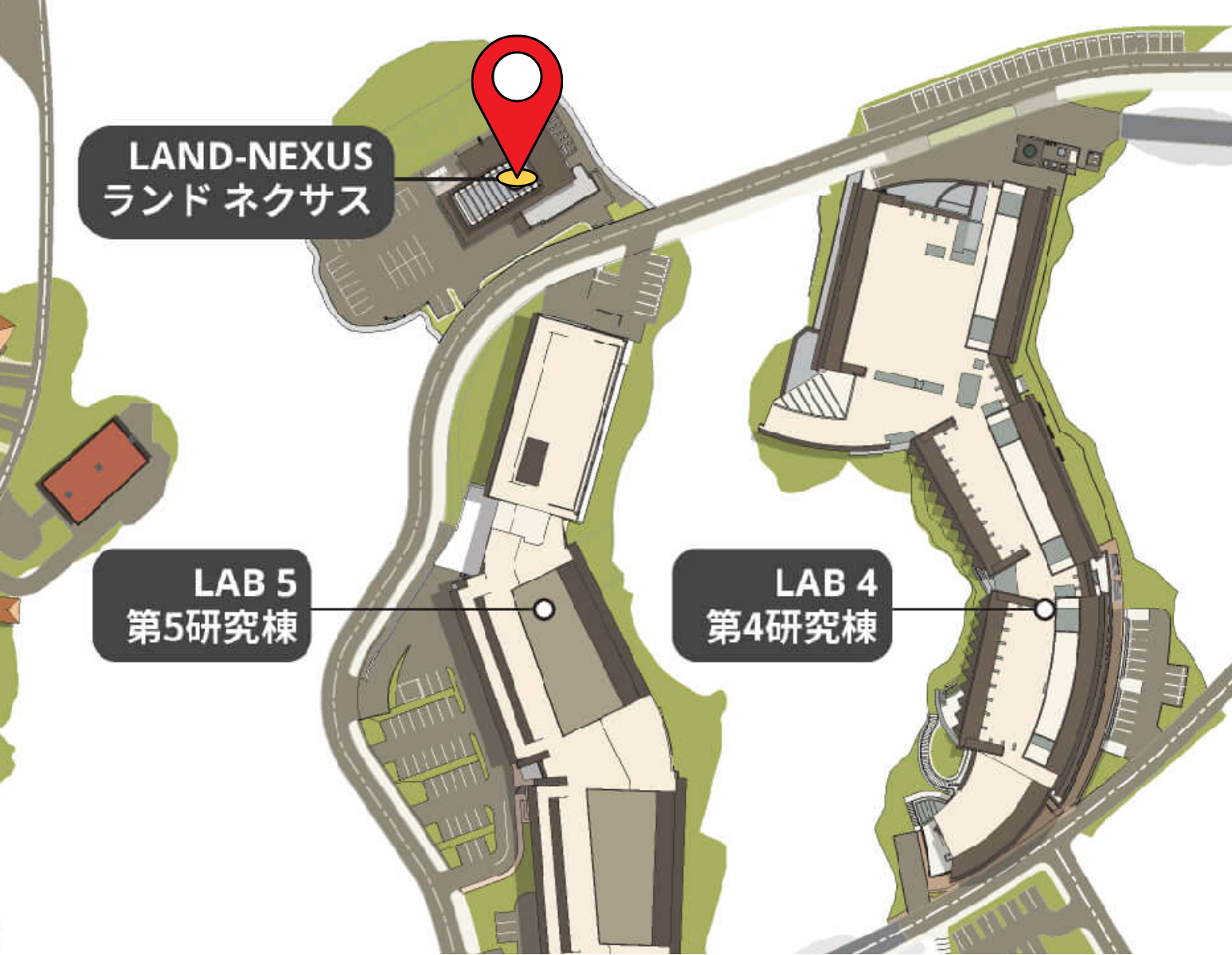
We will be holding SCDA Training Week at LandNexus.
To get to Land Nexus with minimal rain:
Please see the session summaries section below for individual room location.
Location: Land Nexus, 1F Open Space
Speakers: SCDA Team
“Welcome to the Scientific Computing & Data Analysis Section (SCDA)!
This session introduces who we are, what we run, and how to get access.
Part 1: SCDA services
Part 2: OIST network services
Session Material
An overview of the network services available to researchers and administrative staff:
Location: Land Nexus 2F Open Space
“Come meet the SCDA team and bring us your HPC questions. Whatever you’re stuck on, we’re here to help.
We’ll also help you get set up for cluster access:
ssh cluster instead of typing the full username and hostname every timeDrop in for one-on-one help. This is a great opportunity for new users as well as experienced users!”
Location: Land Nexus 2F Open Space
Speaker: Jan Moren, SCDA
Session Material
“At OIST we provide high-performance cluster computers for your scientific computing needs. In these two two-hour training sessions we will show you how to make best use of the HPC resources at OIST. You don’t need any previous experience.
In the first session, we show how computing clusters are organized and introduce the fundamental concepts of parallel computing. In the second hands-on session we will learn how to log in, then learn to run jobs on the OIST clusters.”
Location: Land Nexus 1F Open Space
Speaker: Jan Moren, SCDA
Session Material
“The command line is the primary way for us to use the HPC systems at OIST, as well as elsewhere. It is powerful and flexible once you know it well, but it is confusing, unwelcoming and very intimidating when you are a beginner.
In this compact 2-hour training we will start from the very beginning and learn the fundamentals and how to tweak our environment.”
Location: Land Nexus 2F Open Space
Speaker: Jan Moren, SCDA
Session Material
“Reliable data storage is fundamental to research. In this training we will introduce the storage systems, talk about how to organise your data, do backups, handle remote data transfer, and the do’s and don’ts of using the storage systems.”
Location: Land Nexus 1F LN113
Speaker: Charles Plessy, Luscombe Unit
“Learn why workflow systems matter for reproducible and scalable research, and how Nextflow and nf-core simplify complex analyses. We will cover practical execution on Deigo, troubleshooting, and support resources, followed by a hands-on pipeline run.”
Location: Land Nexus 1F LN113
Speaker: Igors Dubanevics, Kondrashov Unit
“Collaboration is hard to sustain if you don’t see each other regularly. With cloud-based services, like GitHub, you can create a coding project, share it with others, and keep track of changes. In this session, we will introduce tools to track the history of your code and how it can be effectively shared with others. We will learn about ubiquitous Git as a version control system and how it can be integrated with GitHub. No previous experience with Git or GitHub is expected.”
Location: Land Nexus 1F LN113
Speaker: Pavel Puchenkov, SCDA
“This lecture covers graphics for publications, including plots and cover pages. We’ll discuss various tools, tips for printing and visualization pipelines. On top of that, together, we’ll explore real-world use cases.”
Location: Land Nexus 1F Open Space
Speaker: Patricia Muskus, SCDA
Session Material
“This session is a short R programming survey, aimed at those of you with some limited experience programming. If you are completely new to programming you will still be able to follow along. Because the training is short, we will focus on basic concepts only. What to expect? On day 1 we will go through the main parts of R programming syntax, data types, R objects & data wrangling. On day 2 we will continue our introduction to R programming using RStudio (R’s IDE), including R’s file system, how to create projects, how to install packages and load libraries, and we will end with a quick introduction on how to use R & RStudio IDE in Deigo. Please bring your own laptop with R and RStudio installed locally!”
Location: Land Nexus 1F Open Space
Speaker: Patricia Muskus, SCDA
Session Material
“This session is a short introduction to data visualization using R’s ggplot2 package. It is aimed at those with some working knowledge of R and serves as a natural follow-up to the Introduction to R Programming survey. We will learn the building blocks of ggplot2 by recreating figures from a published paper, including boxplots, PCA plots, volcano plots, and Venn diagrams. Please bring your own laptop with R and RStudio installed locally!”
Location: Land Nexus 1F LN113
Speaker: Ryuta Kunida, Takuya Sakashita, IPA
“IPA helps researchers analyze data from expression and SNP microarrays, proteomics experiments, and small-scale experiments that generate gene lists. It provides insights into molecular and chemical interactions, cellular phenotypes, and disease processes within a biological system.
Join our guest speakers for a full-day seminar on QIAGEN Ingenuity Pathway Analysis (IPA). The seminar will include an overview of IPA, core analysis, omics data analysis, how to use public omics data, and the latest features and updates.
We will conclude with a one-on-one and group session where participants can ask questions and discuss their own data and analysis needs.
Please see the poster for more detailed information.”
One on One/Group Session requires registration. Please register here.
Location: Land Nexus 1F Open Space
Speaker: David Soto, SCDA
Session Material
“In this session, we will discuss why AI + HPC matters and what it can offer to the OIST research community. We are going to look at practical ways AI can support scientific computing by serving as a Co-pilot throughout the entire HPC workflow, including general concept consultation, selecting the appropriate HPC resources for your analyses, generating Slurm scripts for your jobs, code debugging, optimization and profiling, data movement and storage, and experiment reproducibility. These ideas will be brought to life through short live demos, giving you a glimpse of how AI can become a practical tool for your everyday research and computing tasks. We will also share some tips on what NOT to do with AI and HPC, and discuss why scientific judgment and benchmarking should remain human responsibilities.”
Location: Land Nexus 1F LN113
Speaker: Uday Sankar Palani, SCDA
Session Material
“We will explain in detail how research equipment’s can be connected to the OIST network and securely accessed from campus or remotely. Participants will learn when and how to request specialized network services and clarify queries from users.”
For administrative staff only, please register here.