



The research storage is where all OIST research data is stored and archived. It is a university-wide resource that all OIST members have access to.
The storage systems at OIST are available for all OIST researchers. Each unit has their own folder on the system, and you normally have access only to the storage folder for your unit. To access Bucket, the main storage system, as a remote folder you don’t need an account and you don’t need to apply for access.
If you want to access the storage using SSH or Rsync, you do need to apply for access to the cluster. Please see our section on copying and moving data for details.
If you are a student you may need to ask your unit leader to add you to the unit member list before you can access the unit storage.
We have three types of storage systems at OIST.
Secure storage and long-term archiving of research data. These are the systems you would use for storing working data and published information that would need significant effort to replacate or recover.
Bucket is a high-capacity, expandable online storage system meant for long-term storage. It is regularly backed up off-site to Naruto, a tape system in Ginoza. Naruto is also used for reseach-data archiving.
Comspace is a self-managed storage system with fine-grained permissions where units can create filesystems and manage user access by themselves.
| System | Capacity | Allocation | Backed-up |
|---|---|---|---|
| Bucket | 60PB | 50TB/Unit (expandable) | Yes |
| Naruto | ∞ | As needed | — |
| Comspace | 200TB | 5TB/unit | No |
Quickly read and write data during a job. These are meant to be fast more than reliable, and you should not keep any data here when you are not actually running a job that uses it.
Deigo Flash and Saion Work are fast, in-cluster storage systems that prioritize speed over capacity. They are not backed up and not expandable.
Scratch is node-local storage that is very fast, but is low capacity and not accessible outside each node.
Use the compute storage for temporary files during computation, then copy any results you want to keep to Bucket for long-term storage. Finally, clean up these systems at the end of your job.
| System | Capacity | Allocation | Backed-up |
|---|---|---|---|
| Deigo Flash | 500TB | 10TB/unit | No |
| Saion Work | 200TB | 10TB/Unit | No |
| /scratch | 0.3-1TB | Per job | No |
This is short-term storage and systems used to transfer data from one place to another. Never keep data here longer than necessary.
Some instruments generate large amounts of data. Use Hpaqcuire to quickly transfer the data to Bucket for long-term storage; or to your own local workstation.
Datacp is a specialized partition with very fast access to all storage at OIST. Use it when you need to transfer large (TB+) data sets from outside or between other storage systems.
Datashare is a folder on the Deigo login nodes that lets you quickly share public data between users on Deigo.
| System | Capacity | Allocation | Backed-up |
|---|---|---|---|
| HPaqcuire | 70TB | 21-day limit | No |
| Datacp | — | — | — |
| Datashare | 1TB | 1 day | No |
Use your home directory to store your own configuration files, source code, and documents. You can also install software that will only be used by you.
| System | Capacity | Allocation | Backed-up |
|---|---|---|---|
| home | 12TB | 50GB | No |
When you need to send data externally, you can use File Sender. Upload files then invite external people to download them. You can also invite an external user to send files to you.
From the IT section you can get access to Dropbox specifically to share data with outside collaborators. The IT section can also provide an external Teams site for use with external collaborators.
For internal file sharing and administrative documents, use Sharepoint and Onedrive, and for internal communication, please use Teams. You can share data internally using the /Datashare folder on the Deigo login nodes - see the Datashare section here.
This is the overall organisation of the compute storage systems:
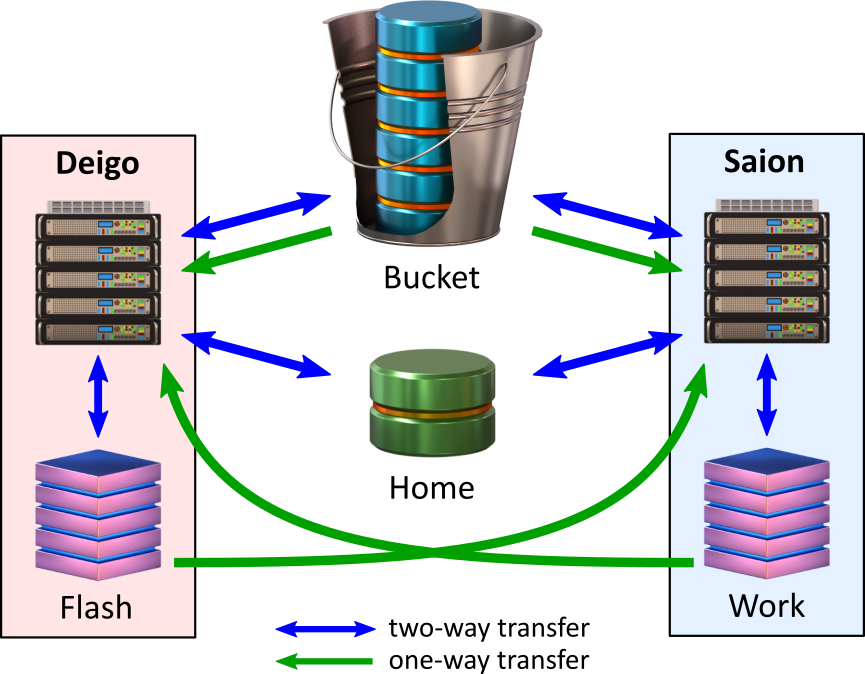
Each cluster has read and writable fast local storage (“Flash” for Deigo and “Work” for Saion).
Bucket is read and writable on the login nodes and through “datacp”, and read-only on the compute nodes. Your home directory is read and writable from anywhere.
In addition, the local storage of each cluster is available read-only from the other cluster. You can do the CPU-bound steps of a computation on Deigo, then GPU-based computation on Saion without having to manually copy data between them.
It is helpful to see a practical example of how to use these systems. Here is the typical workflow for your data:
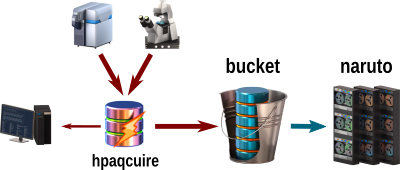
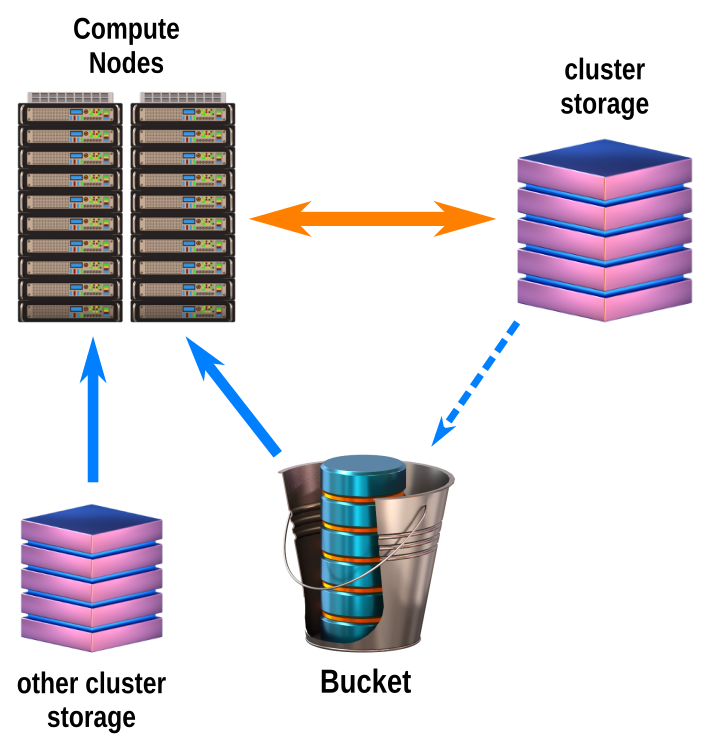
For running jobs on your data, keep your data on Bucket. Read it directly from Bucket on the compute nodes. Use the local cluster storage (Flash for Deigo, Work for Saion) for reading and writing data as you work. At the end, copy the results back to Bucket, using “scp”. Then clean up the local storage.
You can also read data from the local storage of the other cluster. You can split up your computation into separate jobs, with one part running on Deigo, another on Saion, and read the output directly from the previous job. We have more detail and examples on our Deigo page.
If you want to use your own software, install it in /apps/unit/ (or perhaps in your Home) then use it for your analysis and data-processing. You can use the OIST Github account to safely keep your source code if you are developing your own applications.
When you need to securely share data with specific members of your unit or with other OIST members, you can use Comspace. It lets you create a remote share for, say, a specific project and manage fine-grained access rights for individual users. It is mostly meant for access as a remote folder.
When members leave, they sometimes leave behind data owned by their account. The PI can request to change the ownership of the data to a current member so they can take care of it.
See this page for the details on how to request access to the data.