



For general information on our storage, see Research Storage.
The Bucket storage and the Naruto tape system together form our secure long-term research storage infrastructure. It is used for live storage of research data; for off-site backups; and for long-term archiving of data sets that you no longer will need.
Bucket is our large-capacity network file storage system. You can access it from the HPC clusters, from research instruments via HPAcquire, and from personal computers through SSH or mounted as a remote folder.
For the different ways to access Bucket, please see our page on transferring data.
Bucket
| Total capacity | 60 PB |
| Per-unit allocation | 50 TB (expandable) |
Each research unit gets a 50TB storage allocation, and this can be increased if needed. You can request an increase using the form on this page.
We have a few rules and recommendations for using Bucket:
Bucket is used for non-sensitive research data only. Other types of files are not allowed:
Medical and sensitive research data with PII (personally identifiable information) is not allowed. Please contact us if you need to handle such data.
Administrative files are not allowed on Bucket. They frequently contain confidential information about the unit, personal information on unit members and other sensitive data. On Bucket it’s too easy to make this available to all members by mistake (this has happened!). Use Sharepoint for this.
Laptop and workstation backups. Computer backups will often contain licensed software, copyrighted media, personal files and so on that are not allowed to store on our systems, as well as files that are not research data. Bucket is not a backup target.
Personal files. Your holiday pictures, paper drafts, personal documents and so on are often PII (personal information), and also not research data.
Pirated software, movies, music etc. is absolutely forbidden at OIST. If this is discovered or reported to us you will lose access to all our systems.
Bucket is large but not infinite. Also, the number of files as well as the total amount of data matters for the health of the storage.
For your own sake, practice good research data management. Document the origin, format and content of your data.
Define your data lifecycle: Have a well-defined pipeline for your processing, and know when to archive or delete data you don’t need.
Please do not store large numbers of small files. If you have more than a few thousand files in a folder, we strongly recommend that you use zip or tar to pack them together into an archive. It reduces the load on the system, and makes it much easier for you to deal with. If you’ve ever tried to open a folder with 10k+ files from Windows, you know why you should pack files into archives.
With a design capacity of 60PB it is not possible to backup everything. It is too much data, and takes too much time. And of course, a lot of data is temporary, a copy from somewhere else, or not long-term useful in some way. Even in a very well curated data store, not everything needs backing up.
NOTE: Data not in the backup folder will no longer be backed up. See the migration guide for details.
Each research unit has a “Backup/” folder at the top of their Bucket
storage. The folder is 100TB in size, and is separate from the unit
storage itself. This folder is your local backup. You can update it as
often as you like.
To backup your working data you make a copy of it in the Backup/ folder
(see below). To update the backup copy
you overwrite it with the newest data.
The system scans the backup folder weekly. For each backup file it creates a snapshot if the file has changed. The snapshot is stored remotely on the Naruto tape system. This remote backup holds at least 5 snapshots for at most 6 months, though it always keeps at least one snapshot.
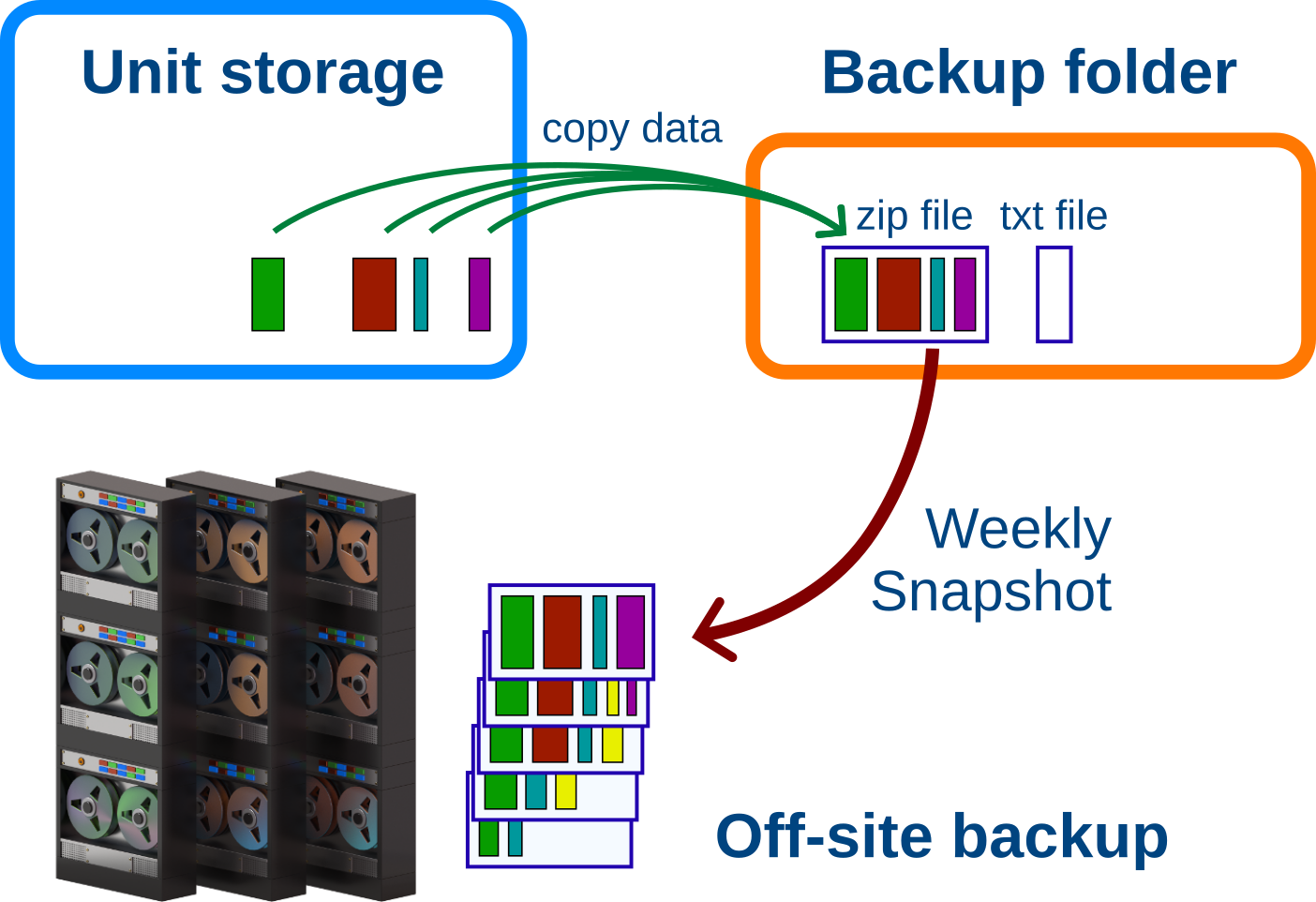
For Example: You backup your active project almost every day with new
changes. Your local backup in Backup/ has the latest copied version of
your files. Once a week, the system creates a new snapshot of your backup
archive and saves it remotely.
After about 1 month there are 5 weekly snapshots of your project. When the next snapshot is added, the oldest snapshot is deleted, to keep the total at 5.
When you stop working on the project you no longer update the backup. The backup archive doesn’t change, so new snapshots are no longer being made. The existing snapshots will become older and older. Once a snapshot is older than 6 months, it is deleted. However, the last snapshot is not deleted. It will remain as long as the local backup copy is there.
If you are never going to use the data in the future but can’t delete it, consider archiving your data instead so it doesn’t take up space in your backup.
We do not accept individual files and folders in the backup folder. It is very inefficient to move and store many small files; also, it’s much easier to find and restore data if it is already organized in a recognizable way.
Instead we ask you to create an archive file and a description file for each backup. It could be one backup per unit member, or a backup per project, or organized some other way that makes sense to you.
See further below for Windows-specific instructions. Here are how to make and update backups from the cluster:
1. Copy all the files you want to back up into an archive file under
the Backup/ folder. The archive can be zip, tar, tgz or some other common
format. Zip is available both on the cluster and on all desktops, and works
nicely, so we use it below.
You want to call the archive file something descriptive:
“Janne_neuron_project.zip”
On the command line you can create a zip archive directly in the backup folder like this:
# go to the top of your bucket storage
$ cd /bucket/MyunitU

# create the backup archive
$ zip -r Backup/Janne_neuron_project.zip Janne/neuron_project
”-r” tells zip to recursively copy all data in all subdirectories. The
first path is where to put the finished zip file. The following paths are
for the data you want to backup.
2. Next, create a text description file with the same name next to the
backup archive file. With the zip file above, this would be
“Janne_neuron_project.txt”.
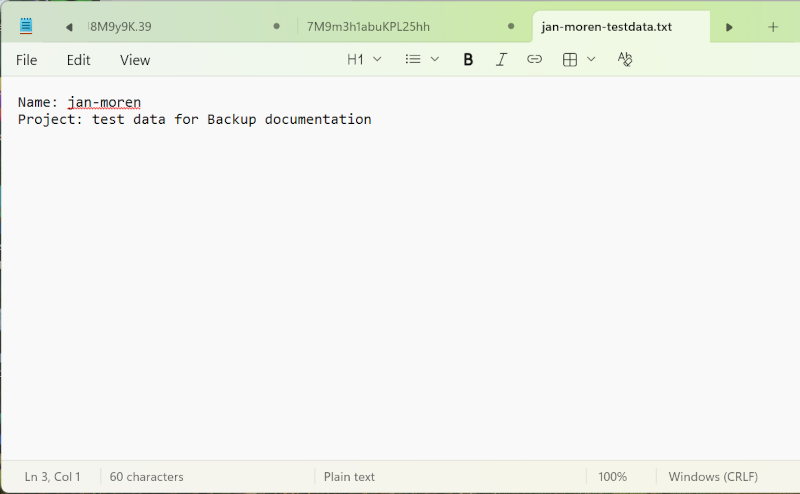
This text file should have the following format:
name: Your Name
project: A name for the project

Any description or further details about
the backup archive; what it's for, what it
contains and so on.
The purpose is for you, your PI or somebody else to understand what the
backed-up data is about, perhaps months or years later. The “name:” and
“project:” lines are important. Without them the data won’t be backed up.
Once the archive file and text file are created in your local backup folder, the system looks for new or changed backup files every week and creates a new remote snapshot.
To update the backup, create a new archive file with the same name and extension, with the new data. You can create it in place if you like; Zip is smart enough to only update the files that have changed.
To update the zip archive we created above you run the exact same command again:
# from the top of the unit bucket run:
$ zip -r Backup/Janne_neuron_project.zip Janne/neuron_project
Zip will compare the project files to the ones already in the zip archive and add or update any changes since the last time you ran it.
Once the remote backup process notices that your backup file has changed, it will create a new remote snapshot with the changes.
To create a Bucket backup from Windows, first map bucket as a network drive. Next, browse to your storage.
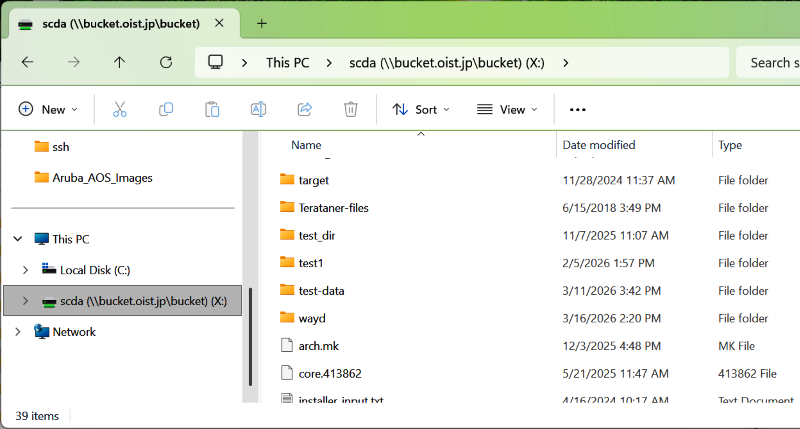
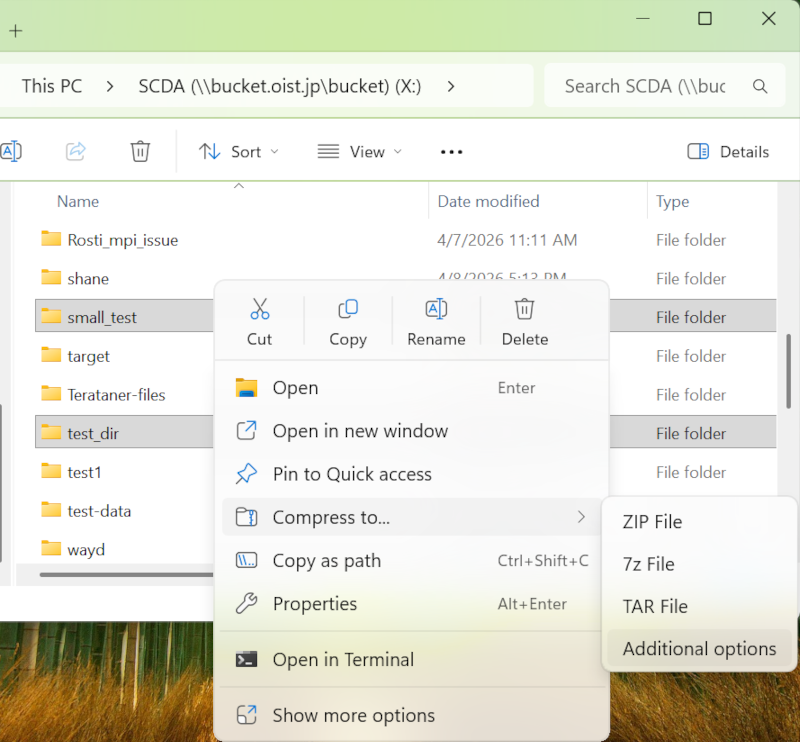
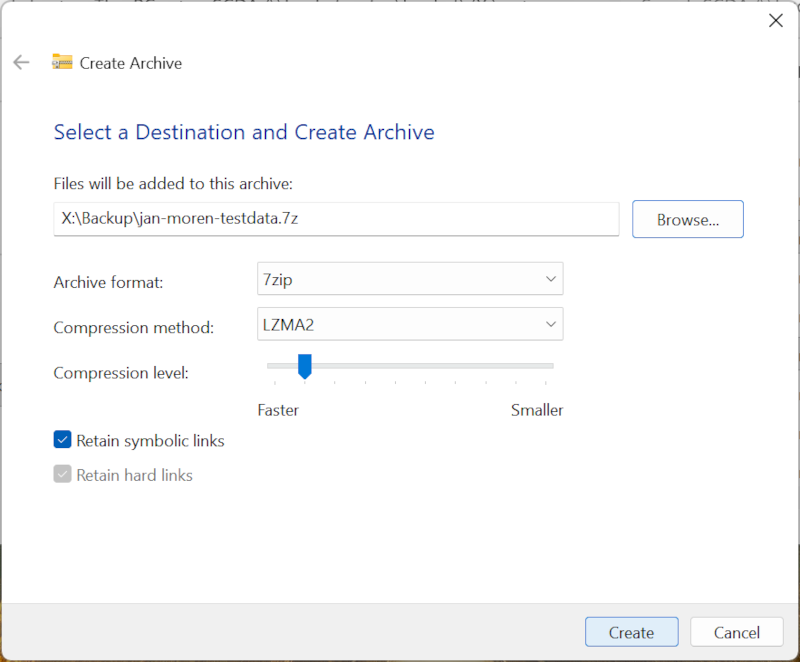
Next, select the folders that will go into your backup. Right-click, choose “Compress to”, then “Additional Options”. This will let us save the archive file directly into the Backup folder.
The dialog window lets you select the file format and the compression level. The default “7zip” is fine. We don’t care about the compression, so you can reduce the compression to “faster” if you want to speed up the process.
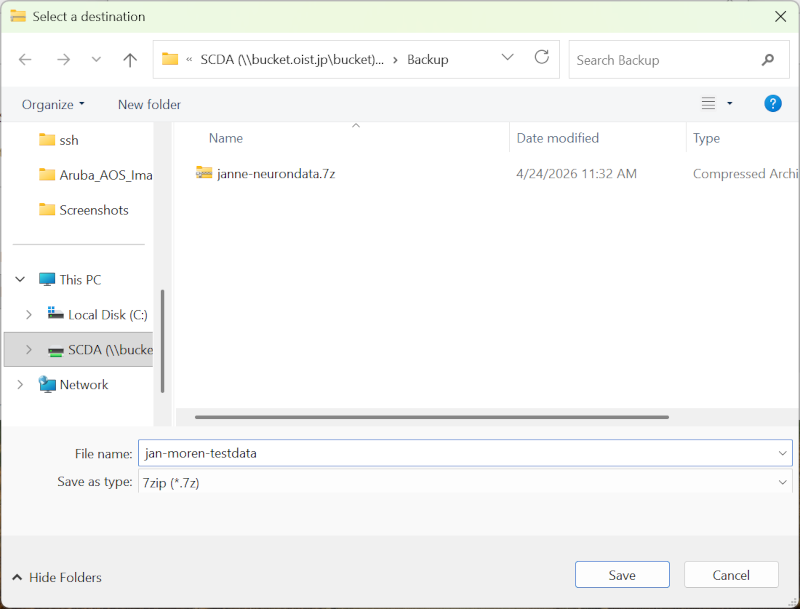
Select “Browse” to choose the destination filder and file name.
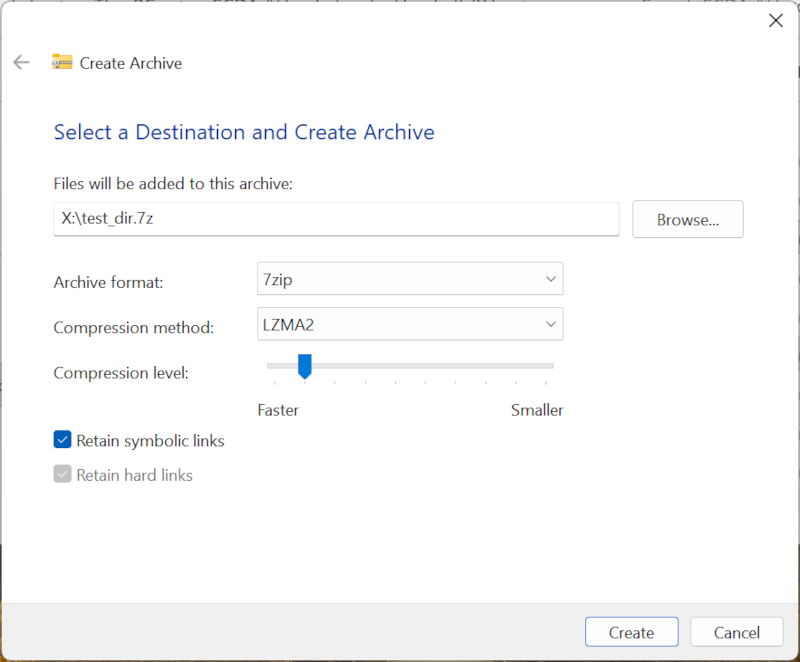
Browse to the “Backup/” folder. Give your archive a name. Click “Save”.
You come back to the previous dialog. Click “Create” in the bottom right corner to create your archive.
If you have lots of data and many files, this can take a lot of time. Big archives are much faster to make on the cluster command line.
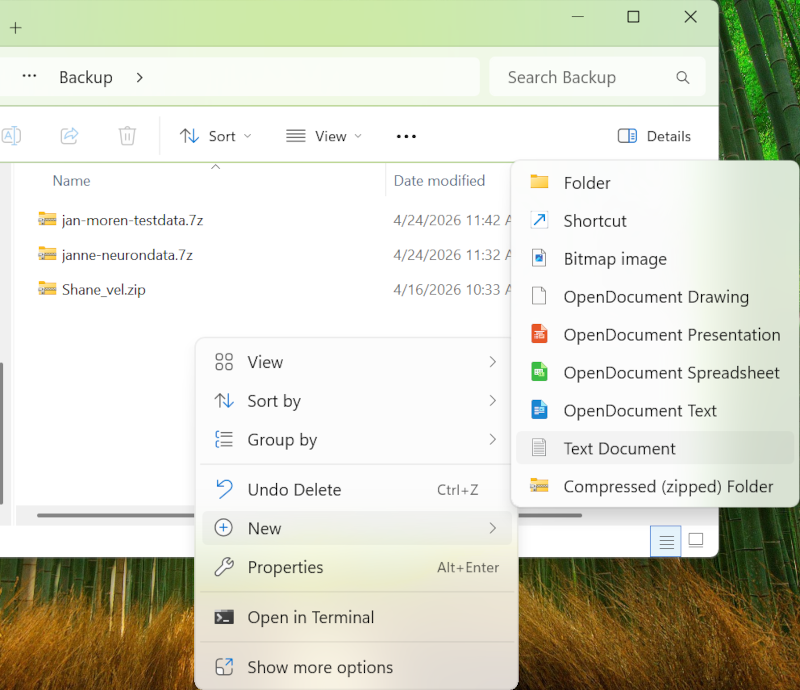
The archive is created! Now, we create the text file that goes with it.
Back in the file browser, go to Backup folder, and right click. In the menu, select “New”, then “Text Document”. This creates a new, empty text file.
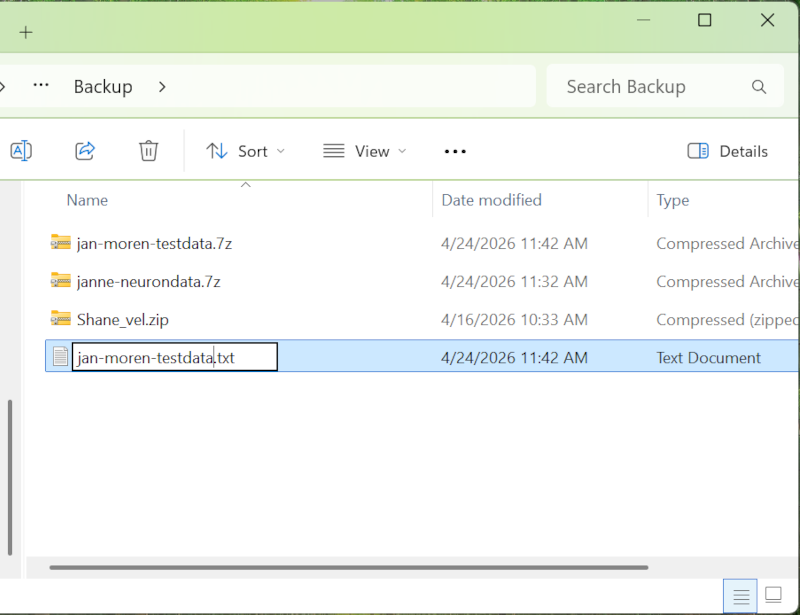
Rename the file to the same name as the archive. If the archive is “jan-moren-testdata.7z”, the text file will be “jan-moren-testdata.txt”.
Right-click the text file, and select “Open”. This will open it in Notepad, a simple text editor. You can also use “Open with”, and select Notepad yourself.
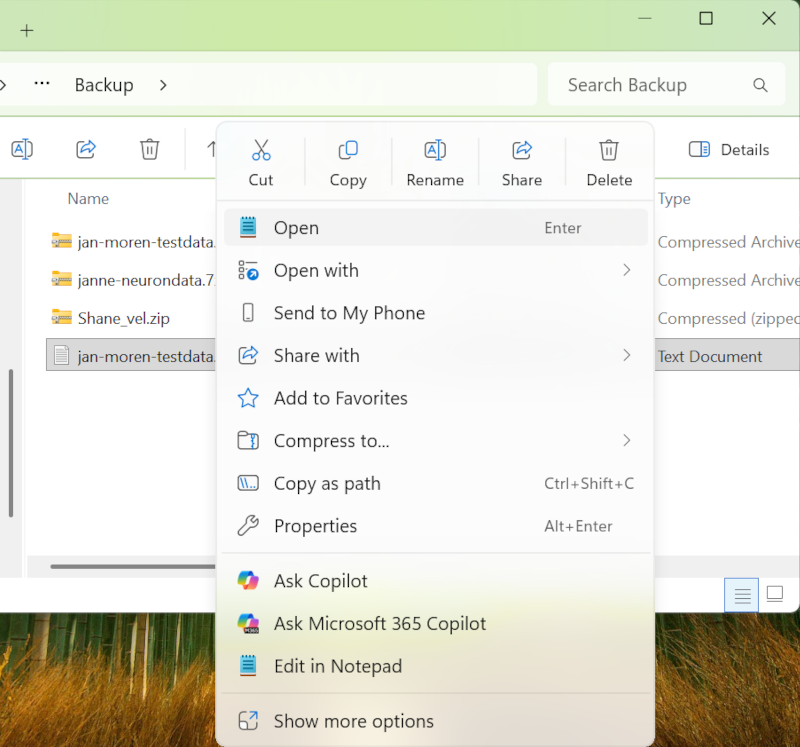
Enter the “name:” and “project:” lines. Remember, this is so that you or someone else can understand whose archive it is, and what this archive is about. Save the file. You’re done!
You update the backup archive the same way you created it above. Create a new backup archive and overwrite the old one. The text description file can stay the same.
The backup system recognizes that the archive has changed and will save a new snapshot.
Your latest backup is available right in your Backup/ folder.
If you need to restore file from an earlier snapshot, contact us at ask-scda@oist.jp. Tell us as clearly as you can what version and what files you need (this is where having a good description helps) and we will try to find and restore it if we can. The exact backup name, file paths, and time frame all really helps narrow it down.
NOTE: In the future, the archiving process will change to something similar to the backup process.
Our archiving service will securely store any data you no longer need access to. OIST research policies specify that reserch data belongs to OIST, and according to Japanese law such data must be archived for future reference.
If you have data sets that are no longer used, you are not allowed to throw it away. Instead, you can archive it on to tape. This will free up storage for your unit, and help you reduce clutter.
For the details and how to request data archiving, please see this page.
Naruto is the OIST tape storage system. It is located off-site in Nago, so even if a disaster strikes the OIST datacenter the data on Naruto is still safe.
Naruto
| Total capacity | ~13 PB |
| Tapes | ~1000 (number and capacity varies) |
The tape system is an IBM TS3500 tape robot system with around 1000 tapes and a total capacity in excess of 13 PB. The system manages all tape operations, automatically verifies tapes on a regular basis and manages data duplication and migration as needed. We add tape to the system as needed to ensure there is sufficient capacity for both backups and archives.
We have implemented the new Bucket backup system as of April 2026. The old system of “backup everything” no longer happens. Here’s some information around this change. You can also jump directly to what you need to do below.
Q1: How did backups work before?
A1: All of Bucket was backed up, once a week. At the time, we stored about 7PB of research data and backing up the changes took about 3 days.
Q2: How do backups work now?
A2: Each unit has a local backup folder of a fixed size. Only data copied into that folder is backed up remotely. In addition the data must be collected into an archive file and minimally documented. See above for all the details!
Q3: Why did we change the backup process?
A3: With 7PB data on Bucket the weekly backup takes 3 days. During the backup cycle no other activity (restoring backups, archiving data) can take place on the tape system.
At about 15PB we would no longer be able to run backups weekly. By about 40-50PB of use we would no longer be doing it monthly - and we’d have long since ran out of space in the tape system.
With the new system the total backup volume is constrained. Also, packing data into archive files greatly improves the efficiency of the process and makes it easier to find and restore data if needed.
Q4: What if 100TB is not enough to backup all our data?
A4: Most research units don’t have 100TB total in their Bucket storage. A few units have more, but of course not all data needs to be backed up - it’s temporary data, or a copy from somewher else, or should be archived. If you are a PI in one of those units and feel 100TB is not enough then please contact us directly!
Q5: All My data is important. Backup everything!
A5: We are constrained by the tape storage size, and also by the bandwidth to Ginoza. It is technically possible to fix both issues, but it is economically infeasible to do so.
Bucket, our current storage system, is very reliable; far more so than, say, a desktop storage NAS, never mind a laptop SSD or a USB backup drive. The risk of data corruption or loss is very small, and not something we worry about.
The offsite backups are here to handle two failure scenarios:
The main one is for business continuity: We have a site-wide disaster (a major earthquake, say), the data center is demolished and the storage is destroyed along with it. The recovery will take months or more, and would necessarily be focused only on the most critical data.
You accidentally delete a file you shouldn’t have. In this case, your local backup folder will have the latest backup so you can go there and recover the lost file yourself. But if the latest version doesn’t have it, we can maybe recover it for you from an earlier snapshot.
The existing old-style backups remain on the tape system. The last old backup (mid-April) will be kept at least for a year or more - any old unit data will have a backup.
But no new backups will happen until you start adding archives to the Backup folder.
Ask all unit members to look at their data on Bucket and decide what
is worth backing up. Then follow the guide above to
create backups in the “Backup/” folder.
Discuss internally what kind of backup strategy you want to have in your unit. If you’re not using Bucket a lot then each member deciding on their own is probably fine. If you have a lot of data and a lot of projects you may want to have a unit policy in place.
Do you want a backup file per member? One backup per project? Can a unit member split their work into multiple backup archives? What information should the description file have?
We understand this is a big change. Feel free to ask us for advice for your particular situation.